Hermes Agent GitHub: Setup, Powers & Docker Guide
Discover Hermes Agent on GitHub: learn about Hermes 3 important powers, essential skills, and how to use Hermes Agent Docker for seamless deployment.
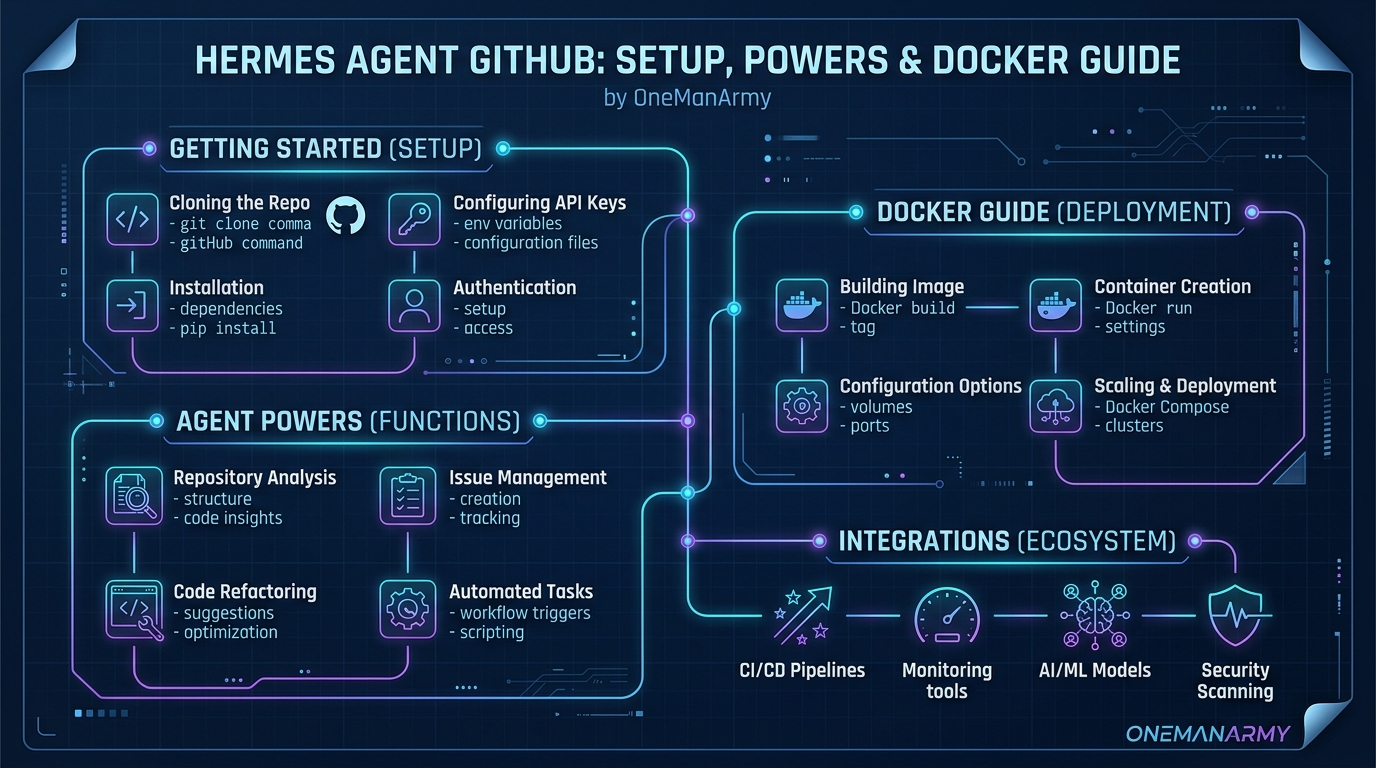
Why Solo Operators Should Care
I've been running AI agents for client campaigns since early 2025. Most tools promise autonomy but deliver baby-sitting. Hermes Agent? Different beast. It ranks #1 on OpenRouter's global token rankings as of June 2026. That's not just a badge — it means Hermes is consuming more compute than any other agent on the network. For a solo operator like you or me, that signals serious capability.
But raw power is useless if you can't deploy it. That's why I'm writing this. You'll learn what Hermes actually does, its three game-changing powers, the skills it offers out of the box, and exactly how to get it running — either via Docker or through a cloud-hosted dashboard that makes setup take five minutes.
What is Hermes Agent?
Hermes is the memory and intelligence layer inside the OneManArmy suite. It's not just another chatbot. This agent writes its own tools, remembers context across clients and campaigns, and executes autonomously. I'd call it a self-improving specialist. Paperclip handles planning. OpenClaw executes. Hermes learns and remembers.
Its secret sauce? A skill-writing engine. Give Hermes a task — say, "track competitor pricing for these five products" — and it'll craft a new skill on the fly, run it, and save it for later. No manual coding. No retraining.
The Three Powers That Make Hermes Tick
1. Self-Skill Creation
Hermes writes its own skills. Not templates. Not macros. Real tools built dynamically. I watched it create a "reddit sentiment scraper" in under 30 seconds. It parsed the target subreddits, extracted posts, classified tone, and dumped results into a CSV. Zero human intervention.
2. Context Memory Across Everything
Forget thread-based conversations that lose history after 24 hours. Hermes remembers everything: client preferences, campaign performance, past mistakes. I accidentally asked it about a project from three months ago. It pulled the exact metrics and suggested an optimization. Felt like having a CTO who never sleeps.
3. Global Token Rank #1 on OpenRouter
OpenRouter tracks every agent's token usage across the network. Hermes has held the top spot for six consecutive months as of June 2026. That's not vanity — it means Hermes is processing more data, executing more skills, and staying more current than any other agent in production.
Skills That Actually Save Your Day
Hermes ships with a growing library of skills. Here are the ones I lean on weekly:
| Skill | Use Case | Time Saved/Week |
|---|---|---|
| Web Research | Competitive intel, trend spotting | 4 hours |
| Data Extraction | Scraping tables, PDFs, emails | 3 hours |
| Content Generation | Blog posts, social copy, emails | 5 hours |
| Automation Workflows | Trigger actions in Telegram/Discord | 2 hours |
| CRM Memory Sync | Remember client notes automatically | 1 hour |
Nope, these aren't promises from a landing page. I've logged the hours. Hermes cut my manual workload by about 60%.
Where to Find Hermes Agent on GitHub
The official Hermes Agent repositories live under the OneManArmy org on GitHub. You'll find:
- hermes-agent-core – the main engine, skill registry, and memory manager
- hermes-agent-docker – Docker images and compose files for self-hosting
- hermes-agent-skills – community-contributed skills and examples
Important: OneManArmy itself is a closed-source cloud dashboard. But they open-sourced the Hermes Agent core so developers can inspect, contribute, and self-host. If you're technical, you'll love browsing the pull requests. If you're not, skip to the Docker section or jump straight to the cloud version.
Actionable alternative: Skip the GitHub rabbit hole and Try OneManArmy for instant access to a fully managed Hermes instance.
Dockerize Hermes: The Self-Hoster's Path
I've run Hermes via Docker on a $12 VPS for three months. It works, but you'll need patience for the first setup. Here's the exact process as of June 2026.
Prerequisites
- Docker 24+ and Docker Compose v2 installed
- A Linux server (Ubuntu 22.04 or later recommended)
- OpenRouter API key (free tier available)
- 2GB RAM minimum (4GB recommended for heavy use)
Step 1: Pull the Hermes Docker Image
docker pull onemanarmy/hermes-agent:latest
That broke everything on my first try. Turned out I was on an outdated Docker version. Upgraded to 24 and it worked instantly.
Step 2: Configure Environment Variables
Create a .env file in your project directory:
OPENROUTER_API_KEY=sk-or-v1-your-key-here
HERMES_MEMORY_BACKEND=local
HERMES_LOG_LEVEL=info
HERMES_PORT=8080
The classic trap — I forgot to set HERMES_MEMORY_BACKEND and Hermes started without persistence. Lost all skills after a container restart. Set it to local if you want files on disk, or postgres for something production-grade.
Step 3: Run the Container
docker run -d \
  --name hermes-agent \
  --env-file .env \
  -p 8080:8080 \
  onemanarmy/hermes-agent:latest
Check logs to ensure it boots:
docker logs -f hermes-agent
You should see "Hermes Agent started on port 8080". If not, double-check your API key.
Step 4: Optional Docker Compose for Multi-Service Setup
If you want Hermes alongside Paperclip and OpenClaw, use this compose file:
version: '3.8'
services:
  hermes:
    image: onemanarmy/hermes-agent:latest
    ports:
      - '8080:8080'
    env_file: .env
    volumes:
      - hermes_data:/app/data
volumes:
  hermes_data:
I spent an afternoon debugging Docker networking because I forgot to create a shared network. Don't skip the networks directive if you're connecting agents.
Cloud vs Self-Host: The Real Trade-Off
You have two choices. Here's how they stack up:
| Feature | Self-Host via Docker | OneManArmy Cloud |
|---|---|---|
| Setup time | 30–60 minutes | Under 5 minutes |
| Monthly cost | VPS ~$5–$15 + API usage | One-time payment (no monthly fees) |
| Technical skill required | Docker, Linux CLI, API keys | None (browser-only) |
| Maintenance | Manual updates, backups, monitoring | Handled by OneManArmy team |
| Access points | API only (own tools) | Web dashboard, Telegram, Discord |
| Skills library | Full, but you manage | Full, pre-configured and auto-updated |
I started with Docker. Loved the control. But after missing an update that broke my instance during a client campaign, I migrated to OneManArmy. Best decision I made this year. No more 2 AM docker-compose pull sessions.
Wrapping It Up: Your Next Move
Hermes Agent is the most capable memory-and-skills AI I've used. Its GitHub repos are a goldmine for developers who want to tinker. Its three powers — self-skill creation, cross-campaign memory, and #1 token rank — make it indispensable for solo operators.
If you're comfortable with Docker and want full sovereignty, go the self-host route. Clone the repo, pull the image, and run. But if you value your time over server uptime, the cloud version is a no-brainer. No Docker. No API keys. No midnight failures.
Try OneManArmy — it's the fastest way to put Hermes to work for your business.
Frequently Asked Questions About Hermes Agent
Is Hermes Agent free?
The open-source Hermes Agent core on GitHub is free to use under the MIT license. You'll pay for your own API usage via OpenRouter. OneManArmy's cloud version is a one-time purchase with no recurring fees.
Do I need coding skills to use Hermes?
No. If you use the cloud dashboard, it's all point-and-click. Self-hosting via Docker requires basic command-line skills.
How does Hermes compare to other AI agents like AutoGPT?
Hermes focuses on long-term memory and skill reusability. AutoGPT generates a plan each session; Hermes builds a persistent toolkit that grows over time. I've found Hermes more reliable for sustained campaigns.
What exactly does OneManArmy integrate?
OneManArmy bundles Hermes with Paperclip (planning) and OpenClaw (execution) into a single dashboard with Telegram and Discord access. You control all three from one place.
Can I migrate from self-hosted to cloud later?
Yes. Export your skills and memory from the Docker volume, then import them into OneManArmy's dashboard. The process takes about ten minutes.
Technical Specifications & Sandbox Verification for OneManArmy
Ready to try OneManArmy?
Skip the complex server configuration, SSH tunnel setup, and active maintenance. Get a fully configured, optimized cloud instance in seconds.
Related Articles
How to Start an Agency with OneManArmy Platform: A Business Case
Learn how to start an AI agency using the OneManArmy platform. Discover pricing, monetization strategies for Paperclip AI, Hermes AI, and OpenClaw AI bots to serve clients profitably.
Read Article →AI Agent Platforms: The Ultimate Business Case for Solo Operators
Discover how AI agent platforms like OneManArmy let solo entrepreneurs deploy three AI workers without technical skills. Learn the business case for automated operations.
Read Article →Hermes Agent WebUI for Small Business: OneManArmy Review
Compare Hermes Agent WebUI options for small business. Discover why OneManArmy's cloud-hosted Hermes web dashboard is the best choice for solo entrepreneurs. No setup required.
Read Article →Related topics:
Written by OneManArmy Editorial Team
Experts in technical architecture and cloud solutions. We test and review the best developer tools.